Base Commander
- 4.6
- Rating
- 10.00M
- Installs
- Free
- Price

 Analysis by App-foxy
I spent time with Base Commander as a quick arcade game built around running an army base, and its appeal became clear within the first few sessions: it turns military-base management into a series of short, readable decisions rather than a dense strategy exercise. You tap, train, improve your operation, and prepare for clashes, while the idle structure keeps progress moving when you are not constantly making decisions. That makes it easy to pick up during a short break, although it also means the game may feel too light for players who want deep planning or a long campaign with complex systems.
Developed by Supercent, Inc., this free game sits in the casual arcade space and is suitable for Everyone. It has reached over five million installs and holds a 4.6 average from around eighty-two thousand ratings, which fits my experience of a game designed to be immediately approachable. The current version is 8.0.0, and it runs on Android 7.0 or later. Optional in-app purchases cost $6.99 per item, so the basic download is easy to try, but anyone who dislikes purchase prompts or progression systems with optional spending should pay attention to how the game feels during longer sessions.
How the base reads and guides you through play
I like how the base gives each visit a clear starting point: I can look over what is happening, choose one useful action, and leave without treating the game like a strategy campaign that needs constant attention. That makes the layout especially helpful when I only have a moment to play. The next section looks at how that readable structure interacts with different touch needs and everyday interruptions.
You May Also Like

 Blood Strike: 2.5 Anniversary
Blood Strike’s Loadouts Turn Every Drop Into a Tactical Gamble
A close look at Blood Strike’s custom loadouts: how fast access to signature weapons reshapes its battle royale rhythm, rewards preparation, and narrows the gap between fights.

 Pandora - Music & Podcasts
Pandora’s Music Is Easy to Start, but Harder to Recover
Pandora’s strength is its low-effort path from a seed to a station. Its weak spot is how much confidence it asks you to place in connection, setup, and quiet recovery.

 8 Ball Pool
 Is Built on Rivalries, Rematches, and Routine
A close look at the rivalries, rematches, shared routines, and unanswered safety questions that turn a quick pool match into a persistent mobile community.

 Samsung Music
’s Quiet Strength Is Playing What You Already Own
Its reach comes less from spectacle than from dependable access to a personal library. That simplicity is both the app’s strongest retention engine and its ceiling.

 AccuWeather: Weather Radar
AccuWeather Review: A Quick, Clear Forecast for Everyday Decisions
For everyday plans, the best forecast is the one you can understand quickly. AccuWeather makes rain timing, radar, and local conditions easy to act on, with a few trade-offs.

 Hill Climb Racing
Why Hill Climb Racing Still Turns Crashes Into One More Run
A tiny car, a bumpy hill and one more upgrade: Hill Climb Racing keeps resurfacing because its simple chaos makes every near-miss feel personal.
More From Our News Desk



A straightforward layout for short sessions
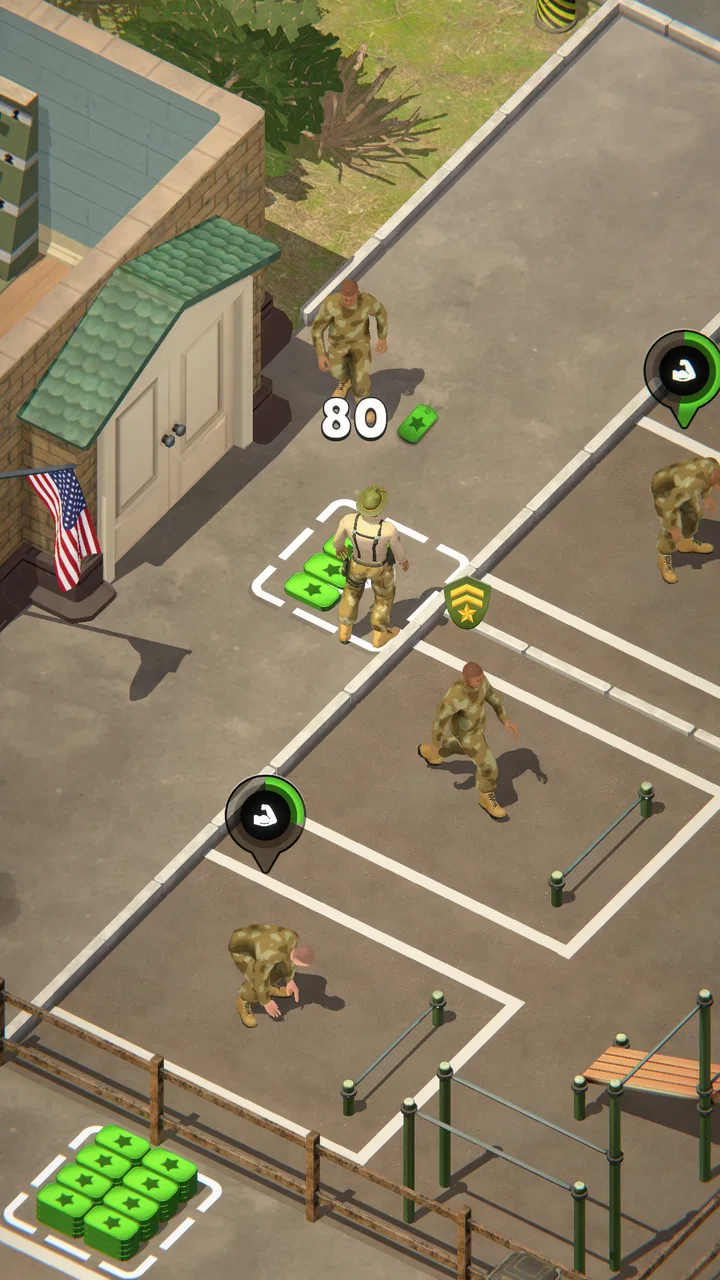
The strongest part of Base Commander is the way it presents its central loop. You are not asked to learn a large collection of menus before seeing what your next action should be. The base gives the game a clear visual anchor, and the tap-driven structure makes the first interaction feel natural even if you normally avoid strategy games. I found myself understanding the basic rhythm quickly: check the base, make an improvement, train or prepare units, then return when another action is available.
That simplicity matters for readability. A player who has trouble keeping several objectives in mind at once can approach the game one visible task at a time. Instead of treating the whole base as one large puzzle, I could focus on the most immediate upgrade or training action and then reassess. This is a useful design choice for people who play while tired, distracted, or switching between the game and another activity.
The arcade classification is also helpful in setting expectations. This is not the sort of army game that demands a notebook, a carefully optimized build order, or a long uninterrupted sitting. Its information is presented for quick decisions. Compared with traditional strategy alternatives, the trade-off is obvious: Base Commander is easier to enter, but it gives up some of the layered planning that makes a full strategy game rewarding over weeks or months.
Where visual clarity can still become tiring
Readable does not always mean effortless. A base-management screen can contain several visual elements competing for attention, especially when upgrades, training actions, rewards, or conflict-related activity appear together. I recommend playing on a comfortable screen brightness and taking a moment to identify the main action instead of tapping rapidly through every visible prompt. That small habit makes the game feel less cluttered and reduces accidental choices.
The tap-first design also favors players who can distinguish interactive areas without much hesitation. If you have reduced vision, visual processing difficulties, or simply prefer large text and strong contrast, the experience may depend heavily on your phone’s display and system settings. Increasing system text size can help with surrounding interface elements, but it should not be assumed that every in-game label will scale with it. I would test the opening section before committing to extended play.
One practical advantage is that the game does not require you to understand every detail immediately. I could postpone some decisions and return after seeing how the base developed. That makes the learning curve gentler than in many strategy games, where missing one early explanation can leave the player confused for the rest of the session.
Useful habits for keeping the interface manageable
I found three habits particularly useful. First, I checked the base before spending resources, because the most visible button is not always the most useful long-term choice. Second, I treated training as a planned part of the loop rather than something to tap whenever it appeared. Third, I paused after a clash or major improvement and looked for what had actually changed. This prevented the game from becoming a blur of repeated taps.
Those habits are more important for players who need extra time to interpret screens or who find rapid interface changes uncomfortable. Base Commander generally lets you play at your own pace during its management moments, so there is value in slowing down. The game is at its best when you use its simplicity to make calm choices, not when you try to rush through every available action.
Different abilities, input demands, and everyday situations
The simple tap-based rhythm is a practical advantage, but it does not make every session equally comfortable: repeated touches, screen size, and how much attention I can spare all affect the experience. I find it works best when I make one considered choice rather than trying to clear every prompt at once. The following section weighs that convenience against the limits of a lighter idle arcade game.
Motor demands are simple, but not absent
Base Commander relies on tapping, which is considerably less demanding than games built around fast swipes, virtual joysticks, or simultaneous controls. That makes it a reasonable fit for someone who prefers one-finger interaction or has difficulty with complicated touch combinations. In my sessions, the core actions felt more like selecting and confirming than performing precise arcade maneuvers.
However, simple controls should not be mistaken for universal comfort. Repeated tapping can still be tiring for people with hand pain, tremors, limited reach, or low stamina. If you use a phone with a large display, reaching buttons near the edges may also become inconvenient during one-handed play. I would use both hands when possible and avoid holding the device in a position that forces the thumb to travel constantly.
The game is less suitable for anyone looking for controller-based play or alternative input methods. A tap-centered mobile design usually assumes direct contact with the screen, and I would not choose this title specifically for advanced physical-access options. It works best when ordinary touch interaction is comfortable and reliable.
Sound, motion, and sensory comfort
The visual theme gives the game an energetic military-arcade identity, but players who are sensitive to busy motion, flashes, or repeated effects should approach carefully. I did not treat the action as something that needed to be watched continuously; the management loop allows you to look away between decisions. That helps in situations where sustained visual intensity is uncomfortable.
For sound-sensitive players, muted or reduced-volume play is the sensible first test. The game’s basic idea is communicated through the base and its controls, so I did not need audio to understand what I was doing. Playing quietly also makes it more practical in shared spaces such as a library, a waiting room, or a bedroom at night.
Players with attention-related difficulties may appreciate the short feedback cycle, but the same cycle can encourage compulsive checking. The base invites you to return for another improvement, another training action, or another result. I recommend setting a stopping point before opening the game, especially if you are using it during work or study. The idle format is convenient, but convenience can easily turn into frequent interruptions.
What a normal day with the game looks like
Imagine waiting for an appointment with only a few minutes available. Base Commander fits that moment better than a conventional strategy game because you can inspect the base, make a focused improvement, and put the phone away without needing to remember a complicated battle plan. Later, during a commute or lunch break, you can return and see how the base has progressed.
That same scenario shows the game’s main limitation. If you want a focused, uninterrupted activity, the idle structure may feel passive. You are often checking progress and choosing the next step rather than constantly controlling an unfolding battle. For a player who enjoys active arcade challenge, a reflex game may provide more satisfying moment-to-moment involvement.
Playing around interruptions and changing energy levels
The game is well matched to interrupted attention. A phone call, conversation, or household task does not necessarily ruin the experience because the core loop is divided into small actions. I could stop after one decision and return later without feeling that I had lost an entire run. This is one of the clearest reasons to choose it over more demanding strategy or action alternatives.
It is less appropriate when you need a completely quiet mental space. Even a simple upgrade loop asks you to compare priorities, remember what you were building toward, and decide whether to continue. If you are already overloaded, the best use may be a very short check-in rather than a long session.
Where the accessible approach stops short
A gentle pace can make a game easier to fit into a busy day, yet it can also leave players wanting more control, clearer access options, or a stronger sense of challenge. I would judge Base Commander by whether its small decisions feel satisfying, not simply by how quickly I can move through them. That distinction helps explain who is likely to enjoy it and who may be happier elsewhere.
Idle progression changes the meaning of skill
Base Commander gives you control over the direction of your base, but it does not make every outcome feel like a direct test of reflexes or tactical mastery. Some players will enjoy that because it removes pressure. Others may feel that the game is doing too much of the work. The central trade-off is between convenience and agency: the less you need to intervene, the easier the game is to fit into daily life, but the less every individual decision may matter.
This is also why the title may not satisfy fans of traditional base-building games. Those alternatives often offer more detailed resource chains, map control, unit combinations, or long-form planning. Base Commander is better when you want the feeling of operating an army base without the administrative weight of a full strategy simulation. It is not the better choice for someone who wants to debate every formation or optimize a large economy.
Optional spending deserves attention
The game is free to download, while in-app purchases are listed at $6.99 per item. That does not automatically make the experience unsuitable for players who avoid spending, but it does create an important boundary. I would begin with a no-purchase approach and see whether the natural pace feels satisfying. If progress starts to feel like a sequence of prompts to speed things up, the free version may no longer feel as relaxed as the opening suggests.
This matters particularly for younger players, even though the content rating is Everyone. A family-friendly age rating describes the content context, not whether every child will understand optional purchases or manage repeated requests responsibly. Parents should use the device’s purchase controls and explain that the base can be played without treating every paid option as necessary.
Small-screen and cognitive barriers
Players with limited vision, dyslexia, memory difficulties, or slower processing may find the basic loop approachable but still need more time with the interface. The game’s simplicity reduces the number of systems to learn, yet it does not remove the need to identify buttons, understand progress, and remember which improvement is currently worthwhile. I would recommend trying it in portrait or landscape positions, if the device permits comfortable viewing, and choosing whichever reduces scrolling or reach.
People who rely on screen readers, switch access, magnification, or other assistive technologies should treat compatibility as a personal test rather than assuming that a simple tap game will work smoothly with every tool. Direct touch is central to the experience, and an interface that looks obvious to one player may still be difficult to navigate with an alternative input method.
There is also a social and thematic consideration. The army-base setting will not appeal to everyone, and players looking for a neutral city builder, puzzle game, or peaceful management experience may find the military framing distracting. The mechanics are light, but the theme remains part of the identity.
Who should download it and who should choose something else
Before I recommend a download, I think about what the player wants from an arcade game: an easy check-in, a demanding test of skill, or detailed long-term planning. Base Commander is most appealing when a relaxed base-management loop matches that preference, while its touch demands and optional purchases may matter to some households. The closing section turns those trade-offs into a practical choice.
A good fit for casual base managers
I would recommend Base Commander to someone who wants a low-commitment arcade game with a clear base-building fantasy. It works especially well for players who enjoy checking progress several times a day, making one or two decisions, and leaving without losing the thread. It is also a sensible option for people who find full strategy games intimidating but still want to train units, improve a base, and see the results of their choices.
It can suit mixed-experience households because the opening idea is easy to explain. A new player does not need a long tutorial lecture to understand that the base, training, improvements, and clashes are connected. That does not guarantee that every player will enjoy the pacing, but it lowers the barrier to trying it.
Players who should skip it
I would skip it if your priority is demanding real-time combat, precise controls, or a deep competitive meta. The tap-and-idle structure is intentionally more relaxed than those formats. I would also look elsewhere if you dislike waiting for progress, checking the same base repeatedly, or seeing optional purchases in a free game.
Players with significant touch-access needs should test the first interactions before investing time. The controls are uncomplicated, but uncomplicated controls can still be physically repetitive or poorly suited to alternative input. Likewise, anyone sensitive to military themes should choose a different management game even if the arcade mechanics sound appealing.
My practical starting advice
On the first day, I would avoid trying to upgrade everything at once. Pick the improvement that most clearly supports your immediate goal, then observe how training and clashes respond. This makes the progression easier to understand and helps reveal whether the game’s pace suits you without spending money.
I would also decide in advance how often you want to check the base. A few planned visits can make the idle structure feel convenient; constant checking can make it feel like a chore. Finally, play with sound reduced if you need a calmer sensory environment, and use a larger screen or two-handed grip if repeated edge taps become uncomfortable.
My inclusive verdict on Base Commander
Base Commander succeeds because it makes army-base management approachable. Its free entry, Everyone rating, simple touch interactions, and short-session rhythm give it a broad starting point. The 4.6 average and more than five million installs suggest that its accessible arcade formula has found a substantial audience, but the real question is whether you enjoy its particular balance of tapping, waiting, and returning.
From an inclusion perspective, I see a game that supports interrupted play and avoids demanding reflex controls, while still leaving practical barriers around repeated touch, small-screen reading, sensory comfort, alternative input, and purchase pressure. Those issues do not cancel out its strengths, but they make the right setup important. A comfortable grip, controlled volume, deliberate pacing, and clear spending limits can change the experience considerably.
My final recommendation is qualified but positive. If you want a friendly, lightweight arcade base game that can fit between everyday tasks, I think it is worth trying. If you want rich strategy, constant action, or a highly customizable accessibility experience, I would choose a different category or a more specialized title. Base Commander is at its best when you treat it as a calm series of small decisions rather than a serious military simulation. Its biggest strength is not complexity; it is how easily the base fits into the gaps of an ordinary day.
FAQs for Base Commander
01What is Base Commander, and what are its main features?
Base Commander is a strategic simulation game where players manage and build their own military base. The game features resource management, base building, and strategy planning. Players must balance resource allocation, upgrade facilities, and defend against enemy attacks. The immersive graphics and intuitive controls make it engaging for strategy enthusiasts.
02Is Base Commander free to play, or does it include in-app purchases?
Base Commander is free to download and play, offering a range of in-game purchases to enhance the gaming experience. These purchases can include additional resources, special upgrades, or exclusive items. While buying in-game content can speed up progression, it is not necessary to enjoy or succeed in the game.
03What platforms is Base Commander available on, and are there any system requirements?
Base Commander is available on both Android and iOS platforms. For optimal performance, it requires Android 5.0 or later, or iOS 11.0 or later. A stable internet connection is recommended to access all features. The game is designed to run smoothly on most modern smartphones and tablets.
04Does Base Commander offer multiplayer options or is it a single-player game?
Base Commander includes both single-player campaigns and multiplayer options. Players can compete against others in real-time battles or join alliances to collaborate on strategic missions. This dual-mode play adds depth and variety, catering to both solo strategists and those who enjoy cooperative gameplay.
05Are there any privacy concerns or permissions required to play Base Commander?
Base Commander requires certain permissions to function optimally, including access to storage and network connections for in-game data and updates. The game adheres to standard privacy policies, ensuring user data is protected. Players can review the app’s permissions and privacy settings before installation to ensure they are comfortable with the access granted.
Pros
- Intuitive interface for easy navigation.
- Engaging gameplay with strategic depth.
- Regular updates enhance user experience.
- Multiplayer mode boosts replayability.
- Detailed graphics with immersive visuals.
Cons
- In-app purchases can be costly.
- Requires a stable internet connection.
- Initial loading time is quite long.
- Limited tutorials for beginners.
- Occasional server connectivity issues.

Base Commander
Gallery